The people have voted! and 31% of you would like to see some HTML and CSS tutorials, Okay, well to be honest I don’t know where to start teaching you things, I started when I was but 14 years of age, and I learned VERY slowly simply becuase I was learning from the internet which I only had a little bit of access to at the time and in my spare time. I had no idea where to start or what was right or wrong and that long ago there weren’t the big websites that help you out like there are today and there wasn’t any right or wrong way of doing.
I’m not saying I’m an expert but these are a few things I learned along the way.
probably the most basic and helpful tip I can give anyone is STRUCTURE if your code and your files are tidy it is so much easier to write it, rewrite it and learn from it. In my job I have had to rewrite other people’s work or look at other people’s code to decipher if the website needs recoding, and lets face it most of the work we get in from clients their current websites need a total rewrite at the very least so I can read the code properly so I can make the changes the client wants.
Okay so the easiest thing to teach you would be file structure, if you mix all your files up it can be quite difficult to find things and move things about but if you keep things in order then its easy peasy, all the images should be kept together, (and maybe in folders within an image folder if you have LOTS of images) css, scripts and anything else should have its own folder. Below is a diagram of a basic website filing structure which I use every day.
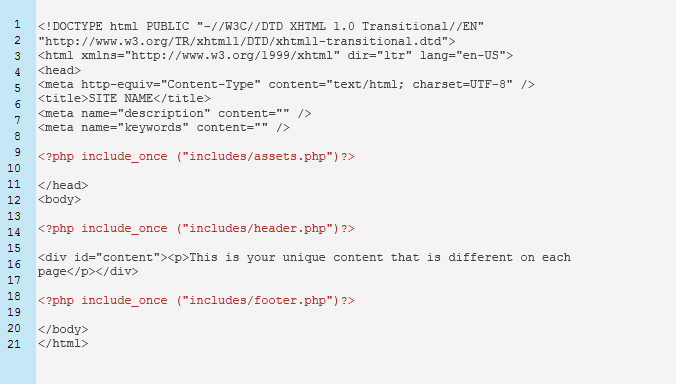
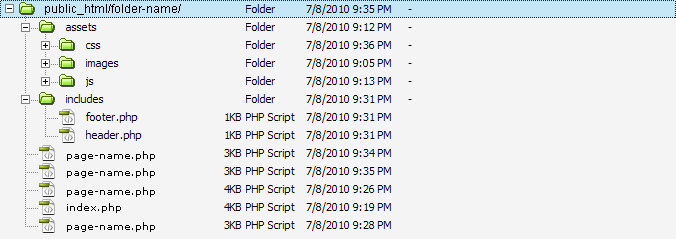 As you can see I use Dreamweaver, which in the past I have hated with a fiery passion, and I still thing it promotes laziness but if you are in the web design business you will know what time is very precious and you will need a programmes that will help you out, and I think Dreamweaver is one of the best in the market. Anyhow this is the file structure I use in all my websites, the ‘includes’ folder is used when using PHP which I will write a tutorial about later on but basically it contains small snippets of code that needs to be included on every page. (this is also very useful and I will write a tutorial on it later).
The ‘assets’ folder is where you keep all your CSS, images and javascript, I would also create a folder for pdfs, or word documents, or any other kind of file you upload to your server. I used to just shove everything in the main folder and it took ages to find what I wanted.
HTML Structure.
What with the HTML 5 coming into play, structuring websites could get a lot easier and a lot more straight forward but thanks to the evil of Internet Explorer that has infected the internet with its F*** You’s to anything that you try to write that is semantic or anything that validates, and all those people who are forced to use Internet Explorer or people who are too lazy, or don’t know enough to update their browsers anything better, HTML 5 will have to wait around for a bit or you as a website designer will have to learn all the tricks to back date all your websites.
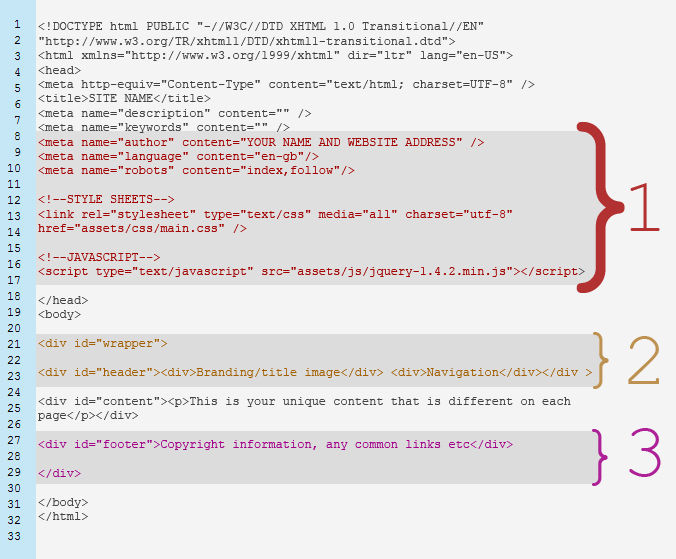
below is my basic HTML structure which I would recommend if you want to make it easy to update. (please note there may be easier ways out there to layout your work but this is what I have found to work best for me)
<!DOCTYPE html PUBLIC "-//W3C//DTD XHTML 1.0 Transitional//EN"
"http://www.w3.org/TR/xhtml1/DTD/xhtml1-transitional.dtd">
<html xmlns="http://www.w3.org/1999/xhtml" dir="ltr" lang="en-US">
<head>
<meta http-equiv="Content-Type" content="text/html; charset=UTF-8" />
<title>SITE NAME</title>
<meta name="description" content="" />
<meta name="keywords" content="" />
<meta name="author" content="YOUR NAME AND WEBSITE ADDRESS" />
<meta name="language" content="en-gb"/>
<meta name="robots" content="index,follow"/>

<!--STYLE SHEETS-->
<link rel="stylesheet" type="text/css" media="all" charset="utf-8" href="assets/css/main.css" />

<!--JAVASCRIPT-->
<script type="text/javascript" src="assets/js/jquery-1.4.2.min.js"></script>

</head>
<body>

<div id="wrapper">
   <div id="header"></div >
   <div id="content"></div>
   <div id="footer"></div>
</div>

</body>
</html>
Head:
This is the basic format I use, and I’m just going to break it down for you now.
DOCTYPE: This little piece of code that tells the browser what version of code has been written in. There are several types of these Doctype
- HTML Strict : contains all HTML elements but doesn’t include deprecated elements like font.
- HTML Traditional : contains all HTML elements including deprecated tags.
- HTML Frameset : the two above don’t include frame sets so if you want to use them use the frame set version. (I wouldn’t recommend framesets they are old and horrible 😉 )
- XHTML Strict : this is the most strict version it doesn’t allow for any deprecated tags, or framesets and the mark up must be written as well-formed XML.
- XHTML Traditional : this is what I use, becuase it allows for a few errors, and I am not saying I make a lot of errors but simply becuase if you want your site to work for ie6 and old browsers sometimes you have to use deprecated tags and little hacks to get the site working across the board. but the mark up must be written in well-formed XML.
- XHTML Frameset: I think you are getting the flow of things right?
for more information about DOCTYPES visit W3School
I would hope you all not what the <html> tag does, there is a little extra code in there that basically sends information to the browser to say what type of html has been written and in what language etc.
META TAGS: The next block of information is the meta tags. These are hidden bits of information that tells the browser things about your website, in the past these have been the main source of information that search engines have used to determine what your site is about, however lately search engines are must more advanced and they are able to read all the content of your site and determine what your site is about from what your write about, so meta tags are no longer the be all and end all of SEO (Search Engine Optimisation) you now have to write the content of your site very carefully, and search engines also determine the value of your site by the type of code you write. ( I know very little about SEO, it is very in-depth and long winded and if you ask me very boring. you can find out a lot more about SEO here at SEO Moz one of the best SEO blogs on the net)
- <title></title> this is pretty self explanatory put the title of your site here … duh lol.
- “description” : here you should put a detailed description of what is on the page, if you have 10 page you need 10 different descriptions becuase different things are written on different pages.
- “keywords” : these are the keywords that describe your site, these can be the same on every page to make it easier or if you want to be complex you can create new ones but keywords are hard to choose especially if you think about it, there may 1000’s of sites with the same keywords as you
- “author” : this is basically to say you wrote it, its a good thing to put your name and website address, this is if you are writing it for someone else so if anyone wants to know who coded it they can find you.
- “language” : pretty self explanatory
- “robots” : this defines rules for robots (web crawlers for search engines)
There are more than this but you only really need to use title, description, keywords. the others are just filler.
JavaScript and CSS: after the meta tags I always put the assets, CSS first and then the JavaScript if need be, many people like to put the JavaScript at the bottom of the site as it can take a while to load and most people want their site to load before waiting for the JavaScript, but many sites these days rely heavily on JavaScript as it is a common language and most people have browsers that enable JavaScript.
As all the code above is written within the head tag it is hidden from the viewer now we get onto the actual content the body of the the HTML file.
Body:
I like to keep this a simple as can be, I always cut my sites into three second HEADER, CONTENT and FOOTER, almost all sites run on this structure, even if the author doesn’t realise it, you may notice that I haven’t put menu in there, well I put that anywhere I want, as long as it fits into one of these three sections. (cutting your site up this way helps when it comes to using PHP includes tutorial soon)
Wrapper: this is probably the most important thing in the site, the wrapper keeps everything within a certain space. even if your site is a liquid layout (a layout that changes width with the size of the browser window) I tend to do all my sites as a fixed width as it make it easier to code and to be sure what it looks like across different resolutions. but adding a wrapper around things means you can control the shape of everything inside the wrapper.
Header: this has everything that appears on every page at the top of the site your website title, main image, and possibly a menu. you can put as many <div> or content in the header as you want, but the main thing is that everything you want on every page should be contained in the header.
Content: this area should contain all your unique copy, from the title of the page down to the last full stop, these shouldn’t be anything that is going to appear on more than one page (unless you have included a sidebar but if you have included a side bar the best way to do it is to divide your content div into two section, the less confusion between the DIV’s the better. (and I implore you DIV’s not tables!)
TABLES ARE EVIL: just a quick note, I learnt tables first, and I used tables for years!! they are easy to use and make it really easy to divide up your page but they are not supposed to be used for content, or layouts or anything like that, the true use for tables has always been data. I remember when my friend Kitty first told me to use DIV’s I was so against them tables were safe and worked so well but they didn’t they were difficult to move and although they layout the site into blocks which is what I am asking you to do with DIV’s using DIV’s you can move things around the page so much more easily and use the CSS to do so much more with them. Tables are great for any kind of data like a size guide, or a pricing table, or anything like that, but keep it data only please.
Content and Sidebars: as I said above try to keep your content separate from the static content of your site, it will help you when you want to edit your site later on and will cut down the amount of time that it takes to redesign your site when you get bored of your layout and if you are anything like me, I always get bored of my layouts almost as soon as I’ve finished the redesign.
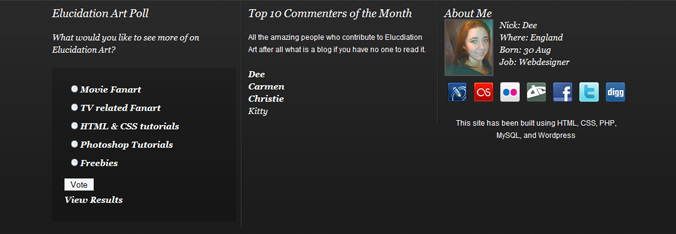
Footer: well all your footer information goes here, most websites have contact details in here, or important information that isn’t very pretty, this could be accreditation, or outbound links, for example my site (at the moment) has a poll, a bit of information about me and all the links to my social networking places, these are important bits of information but they are thing I wanted to show people. I also use this section for a quirky little thing that promotes my commenter, so the more you comment on my site the higher up your name and your website link will appear on the site. However the important thing to remember about the footer is this is for things that appear on every page at the foot of your website.
Okay well I think that’s it, you may think that is a really in-depth way to describe the structure of web site, and most of you probably already know about everything here, but just hope there was maybe something you didn’t know about or something you are going to try out and if you learnt nothing oh well your doing great and didn’t need to read the post 😉 but like I said there are other ways to do thing this is just what works for me.
Organisation is the key to speed and understanding